
How to film your golf swing so your shot traces come out right
An automatic ball tracer has a hard job: find a small white ball moving fast across a few frames of video, then draw the path it took. The clearer that ball is in your footage, the better the trace. A few minutes of setup at the range makes a bigger difference than anything else.
Put the camera down the line
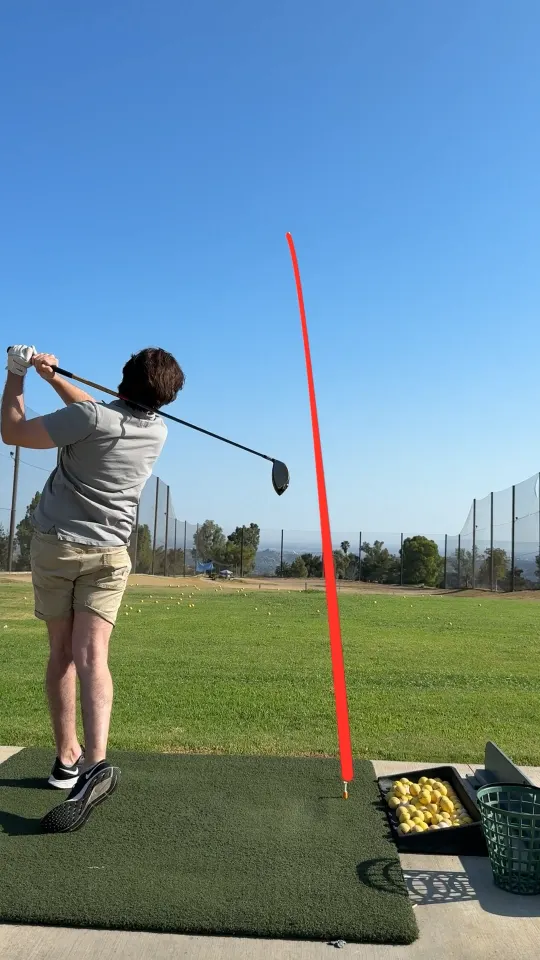
Stand the phone behind the golfer, looking along the target line toward where the ball will go. From this angle the ball climbs away from the camera against the sky, which is exactly what a ball-flight trace needs to see.
A face-on angle, filmed from across the mat, is great for watching the swing itself, but the ball leaves the frame sideways almost immediately. For tracing, down the line is usually the better choice.
Tripod or handheld: both work
Comet handles camera movement, including handheld footage, panning to follow the ball, and zooming. So if a friend is filming, they can film naturally. If you’re filming yourself, a small tripod, a phone clip on an alignment stick, or your bag is simply the easiest way to keep the golfer and ball in frame.
Frame for the flight, not just the swing
- Keep the whole golfer visible, from head to feet, with the ball at address in view.
- Leave room above. Most of the ball’s path is in the sky, so don’t crop tight around the golfer.
- Avoid clutter. People walking through the frame or a busy background behind the ball flight can make the shot harder to pick out.
Vertical video, like the examples on this page, leaves the most room above the golfer for the ball’s climb.
Get the light behind you
Shooting into the sun washes out the sky and hides the ball. Set up so the sun is behind the camera or off to the side. Overcast days are fine too; a flat gray sky actually gives a white ball good contrast. Wipe the lens before you start, because a smudge softens everything.
Record the whole session
You don’t need to start and stop the camera for every swing. Hit record, work through your bucket, and stop when you’re done. Comet finds each swing in the long video and cuts it into its own clip, so one recording turns into a full set of traced shots.
Your iPhone’s standard video settings are a good starting point. Longer and higher-resolution videos take more time to process, and you’ll need enough free storage for Comet’s working copy and the clips it creates.
Quick checklist
- Phone behind the golfer, aimed down the target line.
- Filming yourself? Use a tripod, clip, or your bag. Filming a friend? Handheld is fine.
- Golfer and ball fully visible, with plenty of sky above.
- Sun behind the camera, lens clean.
- Press record once and hit the whole bucket.
Even with good footage, an automatic trace can occasionally miss a shot or need a retry. If a trace fails, retry it from the shot or from the session menu. Our support page covers that in more detail.