
What is a golf ball tracer, and how do you get one on iPhone?
If you’ve watched golf on TV, you’ve seen a ball tracer: the bright line that follows the ball off the clubface and draws its whole flight across the sky. It turns a white speck that’s hard to follow into a shape you can actually read.
What a ball tracer shows you
A trace makes the shape of a shot obvious at a glance:
- Start line. Did the ball start where you were aiming?
- Curve. Is it a draw, a fade, or a slice that got away?
- Height. How high did it climb compared with your other shots?
It also makes your clips far more fun to watch and share. A swing with a trace on it tells the whole story of the shot.
A video tracer shows the ball’s path as it appears in the frame. It isn’t a launch monitor, so treat it as a visual record of the shot rather than a measurement of distance or spin. (Measured ball data is in the works for Comet.)
Manual vs. automatic tracer apps
Manual tracers
With a manual tracer app, you scrub to impact, tap where the ball is, and often mark where it landed or adjust the curve yourself. It works, but it’s slow: every shot needs you to find the right frame and draw the line. For a single highlight that’s fine; for a whole bucket it isn’t.
Automatic tracers
An automatic tracer finds the ball in the video and draws the path for you. The best ones also find the swings, so you don’t have to cut the clips first. That’s the approach Comet takes.
How Comet traces your shots
- Pick a video. Choose one long range or course video, or several at once, from Photos.
- Comet finds every swing. Each swing is cut into its own clip.
- Every clip is traced. Comet queues each clip and draws the ball’s flight automatically, one shot at a time, on your iPhone.
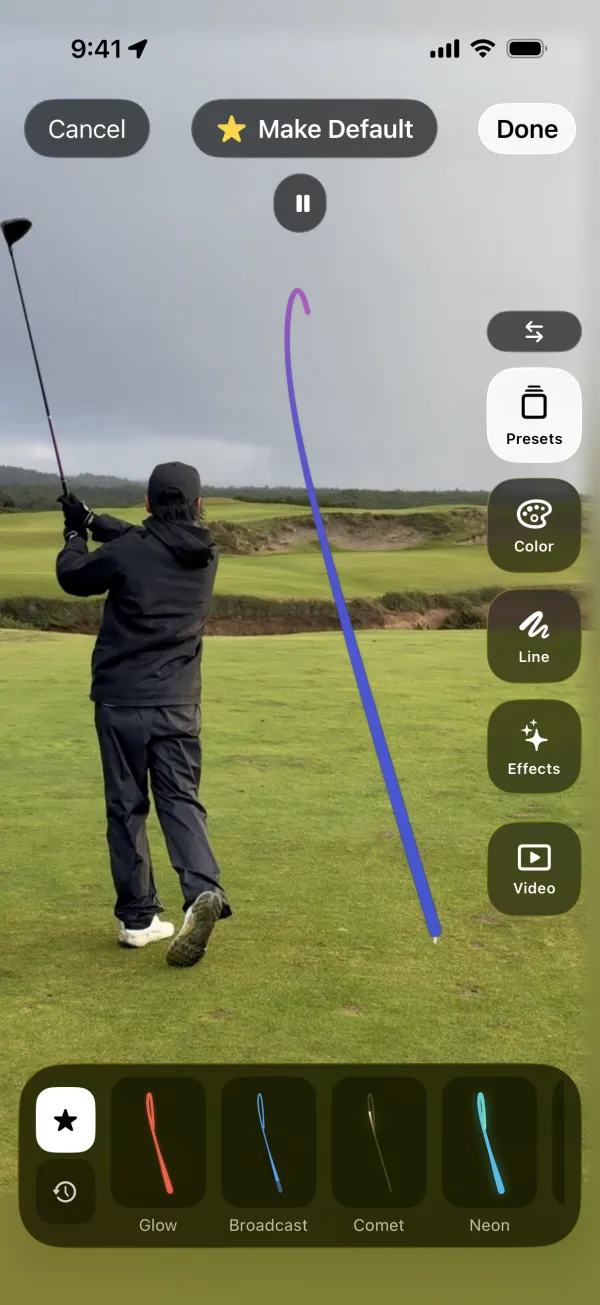
You can choose a trace style, with presets like Glow, Broadcast, Comet, and Neon, and make it your default for future shots.
What makes a trace work
Automatic tracing depends on the footage. A fully visible golfer, good light, and a clearly visible ball give the best results. Comet handles handheld video, panning, and zooming, so a tripod isn’t required. Some shots may not produce a visible trace, and you can retry any that fail. See how to film your golf swing for shot tracing for a quick setup guide.
Your video stays on your phone
Comet does all of this on your iPhone. Your videos, clips, and traces are not uploaded, and you don’t need an account. Read the Privacy Policy for details.