
Launch numbers in Comet: carry, ball speed, launch angle, and start direction
A trace shows you where the ball went. Now Comet tells you how far, and how it got there. Every traced shot comes with launch numbers: carry, ball speed, launch angle, and start direction. There’s no radar unit, no sensor, and nothing to set up. Comet measures them from the same video it traces, on your iPhone.
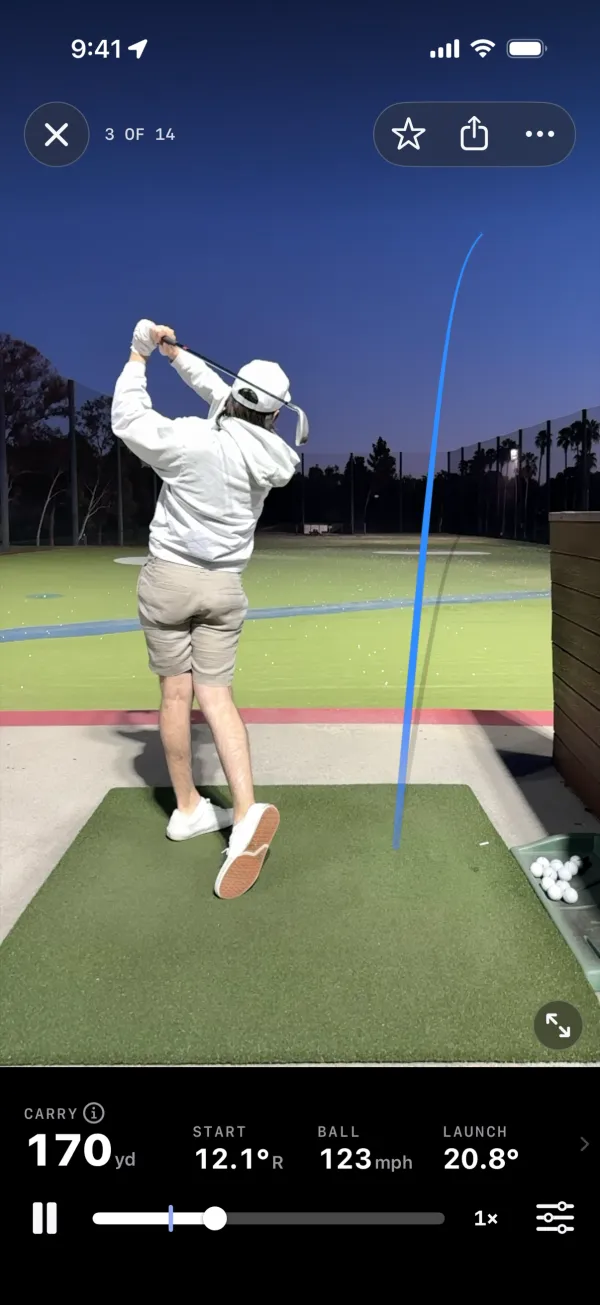
What you get on every shot
- Carry. How far the ball flew before it landed.
- Ball speed. How fast the ball left the clubface.
- Launch angle. How steeply the ball climbed off the face.
- Start direction. How far left or right of straight the ball started.
The numbers appear with the ball the first time you play a shot, then stay put under the video as you swipe through the session. Shots you traced before this update can be re-traced from the same spot to get their numbers. If a re-trace fails, your original trace is kept.
How accurate are they?
In our testing, Comet’s launch numbers are usually within 5–7% of radar launch monitors. That’s from nothing but your phone’s camera, so it won’t replace a fitting-studio radar, but it’s enough to see your real carry with each club and spot when your start line or launch changes.
A few things help Comet get it right:
- Record in Comet when you can. Comet’s own camera is set up for the most accurate launch numbers. Videos you import get numbers too, with more error.
- Film so the ball is easy to see. Good light, the whole golfer in frame, and a clear view of the ball after impact. Our filming guide covers the details.
Comet is also upfront when it’s less sure. A number Comet has lower confidence in shows with a small “≈” in front of it instead of being hidden. And when a video could fit two different ball flights, you can swipe the numbers between them, with a note explaining why.
Your units, your way
Choose yards or metres for distance, and mph, m/s, or km/h for ball speed, in Settings. Comet starts with the usual units for your region, so most golfers never need to change anything.
New: put your numbers on the video
A great shot is more fun to share when everyone can see the carry. Open the trace editor and the new Stats section adds a stats box to the videos you export:
- Five styles: Broadcast, Glass, Clean, Card, and Neon, each with accent colors or a color of your own.
- Pick your numbers: show all four, or just the ones you care about.
- Choose when they appear: for the whole clip, all at impact, or launch numbers at impact with carry arriving a moment later as the ball flies.
- Choose how they appear: fade in, pop in, or count up, with the carry climbing alongside the ball.
- Distance on the ball: an optional label that rides along the trace and counts up the carry as the ball flies, as a small badge or just the number.
- Put it anywhere: drag, pinch, and rotate the box into place on the frame.
The box is on by default for shots with numbers, and it shows up in every trace preview so you see exactly what you’ll share. Like your trace style, you can save stats settings for one shot or make them the default for every new shot. Exporting traced videos is part of Comet Pro.
Still on your phone
Launch numbers are worked out on your iPhone, just like tracing. Your videos aren’t uploaded to measure them, and they work without an internet connection after Comet’s first launch. Read the Privacy Policy for exactly what limited diagnostics the app does collect.
Try it on your next session
Update Comet, record a few swings in the app, and open a shot. The trace draws, the numbers land, and you have a launch monitor in your pocket. Comet runs on iPhone with iOS 26 or later, and includes free scans every month so you can try it on a real session first.